backfeedr Documentation
Self-hosted crash reporting & app metrics for iOS indie developers
What You Get
After setting up backfeedr, you’ll have a complete crash reporting system running on your own infrastructure:
📊 Real-Time Dashboard
Monitor your app’s health with a beautiful web dashboard:
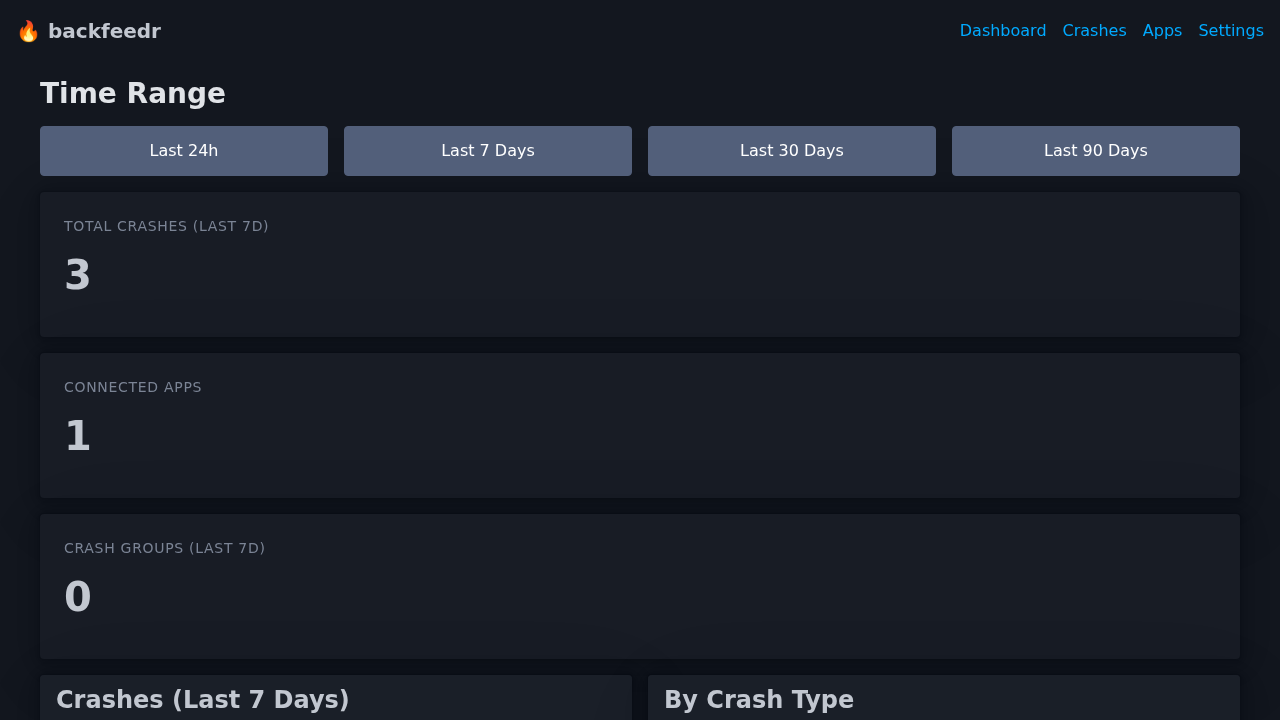 Live dashboard showing crash statistics, trends, and recent reports
Features:
- Live Metrics - See crash counts, active users, and trends at a glance
- Interactive Charts - Visualize crash patterns over time
- Time Filtering - Filter by last 24h, 7 days, 30 days, or 90 days
- Device Analytics - See which devices are most affected
🔍 Detailed Crash Reports
When a crash happens, you get comprehensive information:
 Full stack trace with file names, line numbers, and device context
Each crash report includes:
- Complete stack trace with symbolication
- Device model and iOS version
- App version and build number
- Memory and battery status at crash time
- Locale and timezone
- Grouped by exception type for easy triage
📱 iOS SDK Integration
Simple Swift integration with automatic crash detection:
import BackfeedrKit

// One-time setup
Backfeedr.configure(
    endpoint: "https://crashes.yourserver.com",
    apiKey: "bf_live_your_key"
)

// That's it! Crashes are automatically reported
SDK Features:
- ✅ Automatic crash detection
- ✅ Manual error reporting
- ✅ Event tracking (sessions, custom events)
- ✅ Offline queue (crashes stored when offline)
- ✅ PII scrubbing (removes personal data)
- ✅ Lightweight (< 1MB impact)
Quick Links
- Getting Started - Installation & Setup
- API Reference - Complete API documentation
- Dashboard Guide - Using the web dashboard
- iOS SDK - Swift SDK documentation
- Deployment - Production deployment
- Contributing - How to contribute
Why backfeedr?
| Feature | Firebase Crashlytics | Sentry Self-Hosted | backfeedr |
|---|---|---|---|
| Setup | SDK + Google account | 10+ services, complex | 1 Docker container |
| Data Ownership | Google owns your data | You own it | You own it |
| Privacy | Data shared with Google | Your data stays private | Privacy-first, no third parties |
| Cost | Free (but you’re the product) | OSS but infrastructure costs | Forever free, open source |
| iOS Native | Generic, not Swift-optimized | Generic | Built for Swift developers |
| Resource Usage | N/A (cloud) | 4GB+ RAM | 256MB RAM |
Quick Start
# Clone the repository
git clone https://github.com/steviee/backfeedr.git
cd backfeedr

# Start with Docker (recommended)
mkdir data
docker-compose up -d

# Or build from source
make build
./backfeedr

# Visit your dashboard
open http://localhost:8080
Architecture
┌─────────────┐     HTTPS/JSON      ┌─────────────────┐
│   iOS App   │ ────────────────────> │  backfeedr      │
│  (Swift)    │                     │  (Go Server)    │
└─────────────┘                     │                 │
                                    │  • SQLite DB    │
┌─────────────┐     HTTP            │  • HTMX UI      │
│   Browser   │ ──────────────────> │  • REST API     │
│  (Dashboard)│                     └─────────────────┘
└─────────────┘                            │
                                           │
                                    ┌──────┴──────┐
                                    │   Your VPS   │
                                    │  (You own    │
                                    │   the data)  │
                                    └──────────────┘
Project Status
⚠️ Early Development - APIs may change, features are incomplete. Not yet production-ready.
See our Roadmap for planned features.
Support
- 🐛 Open an Issue
- 💡 Start a Discussion
- 📧 Contact: See repository for maintainer contact
License
MIT © Stephan E. - See LICENSE for details.